create-arthas 使用指南
一行命令自托管 Arthas E2EE 聊天。无需手动配置。
快速开始: npx @arthas-chat/create-arthas → 回答问题 → 30 秒内实例运行。
概述
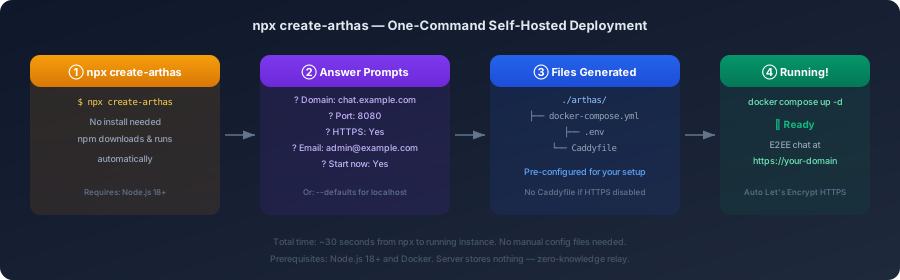
create-arthas 是一个脚手架工具,为你生成可直接运行的 Docker 部署配置。通过交互式问答处理所有配置 — 域名、HTTPS、端口 — 然后可选择立即启动。
前提条件
| 依赖 | 版本 | 用途 |
|---|---|---|
| Node.js | 18+ | 运行脚手架工具 |
| Docker | 20+ | 运行 Arthas 容器 |
| Docker Compose | v2+ | 服务编排 |
使用方法
交互模式
npx @arthas-chat/create-arthas会依次询问:
- 域名 — 你的主机名(或
localhost用于测试) - 端口 — 暴露哪个端口(默认 8080)
- HTTPS — 通过 Caddy 自动获取 Let’s Encrypt 证书(域名非 localhost 时)
- 邮箱 — 证书通知邮箱(启用 HTTPS 时)
- 镜像版本 — 使用的 Docker 标签(默认
latest) - 自动启动 — 是否立即执行
docker compose up -d
非交互模式
npx @arthas-chat/create-arthas --defaults跳过所有提示。使用:localhost:8080、无 HTTPS、立即启动。
生成的文件
无 HTTPS(本地 / 内网)
./arthas/├── docker-compose.yml # 单容器,端口映射└── .env # PORT, GITHUB_OWNER, VERSION有 HTTPS(生产域名)
./arthas/├── docker-compose.yml # 后端 + Caddy 反向代理├── .env # DOMAIN, EMAIL, PORT 等└── Caddyfile # 自动 HTTPS + 安全响应头部署后操作
cd arthas
# 查看日志docker compose logs -f
# 停止docker compose down
# 更新到最新版本docker compose pull && docker compose up -d
# 重新配置(重新运行 create-arthas)cd .. && npx create-arthas
架构
互联网 → Caddy(TLS 终止)→ Arthas 服务器(Go 中继)→ WebSocket 客户端 端口 80/443 内部端口 8080 自动 Let's Encrypt 零知识:只能看到密文无 HTTPS 模式:
互联网 → Arthas 服务器(Go 中继)→ WebSocket 客户端 端口 8080示例
本地测试
$ npx create-arthas --defaults
🔒 create-arthas — Self-hosted E2EE chat in seconds
  Using default configuration (localhost:8080, no HTTPS)
  ✓ Generated files:    ./arthas/docker-compose.yml    ./arthas/.env
  🎉 Arthas is running at http://localhost:8080     WebSocket: ws://localhost:8080/ws
生产部署
$ npx create-arthas
🔒 create-arthas — Self-hosted E2EE chat in seconds
? Domain: chat.mycompany.com? Port: 8080? Enable HTTPS: Yes? Email: admin@mycompany.com? Image version: latest? Start now: Yes
  ✓ Generated files:    ./arthas/docker-compose.yml    ./arthas/.env    ./arthas/Caddyfile
  🎉 Arthas is running at https://chat.mycompany.com     WebSocket: wss://chat.mycompany.com/ws
常见问题
| 问题 | 解决方案 |
|---|---|
docker: command not found | 安装 Docker:https://docs.docker.com/get-docker/ |
| 端口被占用 | 在提示中修改端口或编辑 .env |
| HTTPS 证书失败 | 确保域名 DNS 已解析到此服务器,端口 80/443 已开放 |
| 容器不健康 | 运行 docker compose logs 查看后端错误 |
| 需要修改配置 | 重新运行 npx create-arthas — 会覆盖现有文件 |
许可证
MIT — create-arthas 工具本身使用 MIT 许可证以最大化兼容性。 生成的 Arthas 实例在 AGPL-3.0 下运行。