Chrome Extension Guide
Quick Start: git clone → cd arthas-extension → npm install → npm run build → Load dist/ in Chrome → Set server URL → Chat with E2EE.
Overview
The Arthas Chrome Extension brings E2EE ephemeral chat directly into your browser toolbar. Click the icon, enter a nickname, and start an encrypted conversation. No new tabs, no separate app — just a popup that connects to the same Arthas server.
Build from Source
Prerequisites
| Requirement | Version | Purpose |
|---|---|---|
| Node.js | 18+ | JavaScript runtime |
| npm | 9+ | Package manager |
| Chrome | 116+ | Manifest V3 + chrome.storage.session |
Step 1 — Clone & Install
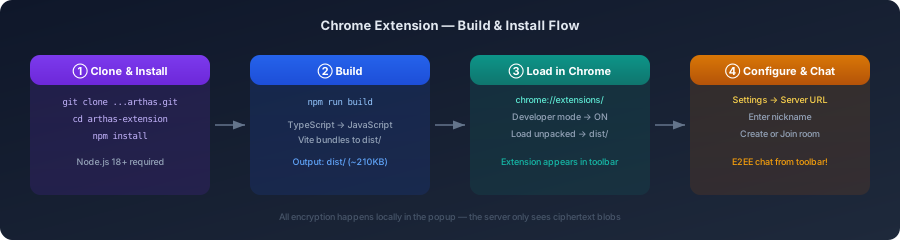
git clone https://github.com/michaelwang123/arthas.gitcd arthas/arthas-extensionnpm installThis installs all dependencies including React, Vite, and the CRXJS plugin that handles Chrome extension bundling.
Step 2 — Build
npm run buildWhat happens:
- TypeScript compiles to JavaScript (
tsc) - Vite bundles the popup, background worker, and assets
- CRXJS transforms
manifest.jsonfor production - Output lands in
dist/(~210KB total)
Step 3 — Load into Chrome
- Open
chrome://extensions/ - Toggle Developer mode ON (top-right)
- Click Load unpacked
- Navigate to and select
arthas-extension/dist/ - The Arthas icon appears in your toolbar
Step 4 — Configure Server
- Click the Arthas icon → Settings ⚙️
- Enter server URL:
wss://arthas100-arthas-server.hf.space/ws
- Click Save → Test Connection → should show ✓ Connected
- Go back to home screen
Usage
Create a Room
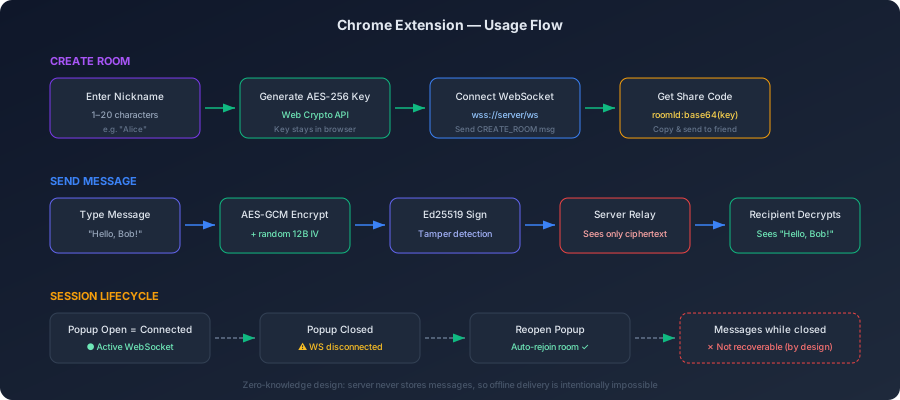
- Enter a nickname (1–20 characters)
- Click Create Room
- The extension generates an AES-256 key locally and connects to the server
- A share code appears — copy it and send to your chat partner
- Start typing — messages are encrypted before leaving the browser
Join a Room
- Paste the share code you received into the “Join Room” field
- Enter your nickname
- Click Join
- You’re in — all messages are end-to-end encrypted
Interoperability
The share code works across all Arthas clients:
| Created with | Joined with | Works? |
|---|---|---|
| Extension | Web App | ✅ |
| Extension | CLI | ✅ |
| Web App | Extension | ✅ |
| CLI | Extension | ✅ |
All clients use the same AES-256-GCM + MessagePack protocol.
Session Behavior
| State | Connection | Messages |
|---|---|---|
| Popup open | ● Connected | Sending & receiving |
| Popup closed (room has 2+ members) | ○ Disconnected | Missed (not stored) |
| Popup reopened | ● Auto-rejoin | Resumes receiving |
| Popup closed (you were the only member) | ○ Disconnected | Room destroyed |
Key points:
- Messages sent while popup is closed cannot be recovered — this is by design (zero-knowledge server)
- If other members are still in the room, the room survives your disconnection
- Reopening the popup auto-reconnects and resumes the session
- For persistent connections, use the web app instead
Development Mode
For active development with hot module replacement:
npm run devThen load the root arthas-extension/ directory (not dist/) as an unpacked extension. The @crxjs/vite-plugin provides HMR — changes to popup code reflect immediately without manually reloading.
Running Tests
npm run test # Single runnpm run test:watch # Watch modeTests use Vitest + Testing Library + happy-dom for component testing and fast-check for property-based crypto tests.
Architecture
┌─────────────────────────────────────────────────────────┐│ Chrome Extension (Manifest V3) │├─────────────────────────────────────────────────────────┤│ ││ ┌──────────┐ ┌──────────────┐ ┌──────────────┐ ││ │ Popup │◄──►│ chrome.storage│ │ Web Crypto │ ││ │ (React) │ │ .session │ │ API │ ││ └────┬─────┘ │ .local │ │ AES-256-GCM │ ││ │ └──────────────┘ │ Ed25519 │ ││ │ └──────────────┘ ││ │ WebSocket (MessagePack) │├───────┼─────────────────────────────────────────────────┤ │ ▼┌───────────────┐│ Arthas Server │ ← Only sees encrypted blobs│ (Go relay) │└───────────────┘Troubleshooting
| Problem | Solution |
|---|---|
| ”Create Room” does nothing | Check server URL in Settings. Test connection first. |
| ”Room session expired” on reopen | Room was destroyed (you were the last member). Create a new room. |
| No console output on click | Rebuild with npm run build, then refresh extension in chrome://extensions/ |
| WebSocket error in console | Server may be cold-starting (HF Spaces). Wait 30s and retry. |
License
AGPL-3.0 — same as the main Arthas project.