create-arthas Guide
Quick Start: npx @arthas-chat/create-arthas → answer prompts → instance running in 30 seconds.
Overview
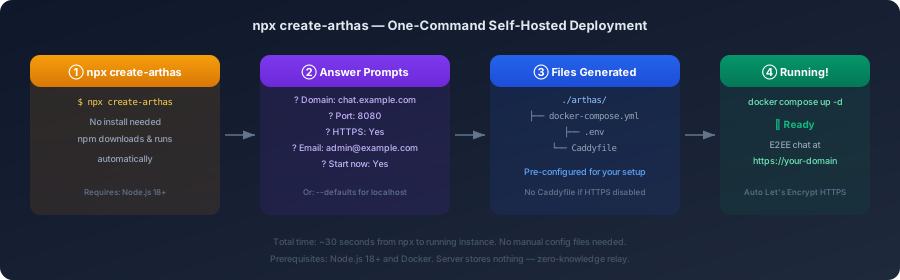
create-arthas is a scaffolding tool that generates a ready-to-run Docker deployment for your own Arthas instance. It handles all configuration — domain, HTTPS, ports — through interactive prompts, then optionally starts everything immediately.
Prerequisites
| Requirement | Version | Why |
|---|---|---|
| Node.js | 18+ | Runs the scaffolding tool |
| Docker | 20+ | Runs the Arthas container |
| Docker Compose | v2+ | Orchestrates services |
Usage
Interactive Mode
npx @arthas-chat/create-arthasYou’ll be asked:
- Domain — your hostname (or
localhostfor testing) - Port — which port to expose (default 8080)
- HTTPS — auto Let’s Encrypt via Caddy (if domain is not localhost)
- Email — for certificate notifications (if HTTPS enabled)
- Image version — Docker tag to use (default
latest) - Auto-start — whether to run
docker compose up -dimmediately
Non-Interactive Mode
npx @arthas-chat/create-arthas --defaultsSkips all prompts. Uses: localhost:8080, no HTTPS, starts immediately.
What Gets Generated
Without HTTPS (localhost / internal network)
./arthas/├── docker-compose.yml # Single container, port mapping└── .env # PORT, GITHUB_OWNER, VERSIONWith HTTPS (production domain)
./arthas/├── docker-compose.yml # Backend + Caddy reverse proxy├── .env # DOMAIN, EMAIL, PORT, etc.└── Caddyfile # Auto HTTPS + security headersAfter Deployment
cd arthas
# View logsdocker compose logs -f
# Stopdocker compose down
# Update to latest versiondocker compose pull && docker compose up -d
# Reconfigure (re-run create-arthas)cd .. && npx create-arthas
Architecture
Internet → Caddy (TLS termination) → Arthas Server (Go relay) → WebSocket clients Port 80/443 Internal port 8080 Auto Let's Encrypt Zero-knowledge: only sees ciphertextWithout HTTPS:
Internet → Arthas Server (Go relay) → WebSocket clients Port 8080Examples
Local Testing
$ npx create-arthas --defaults
🔒 create-arthas — Self-hosted E2EE chat in seconds
  Using default configuration (localhost:8080, no HTTPS)
  ✓ Generated files:    ./arthas/docker-compose.yml    ./arthas/.env
  Starting containers...
  🎉 Arthas is running at http://localhost:8080     WebSocket: ws://localhost:8080/ws
Production Deployment
$ npx create-arthas
🔒 create-arthas — Self-hosted E2EE chat in seconds
? Domain: chat.mycompany.com? Port: 8080? Enable HTTPS: Yes? Email: admin@mycompany.com? Image version: latest? Start now: Yes
  ✓ Generated files:    ./arthas/docker-compose.yml    ./arthas/.env    ./arthas/Caddyfile
  🎉 Arthas is running at https://chat.mycompany.com     WebSocket: wss://chat.mycompany.com/ws
Troubleshooting
| Problem | Solution |
|---|---|
docker: command not found | Install Docker: https://docs.docker.com/get-docker/ |
| Port already in use | Change the port in prompts or edit .env |
| HTTPS certificate fails | Ensure domain DNS points to this server, ports 80/443 open |
| Container unhealthy | Run docker compose logs to check backend errors |
| Want to change config | Re-run npx create-arthas — overwrites existing files |
License
MIT — the create-arthas tool itself is MIT licensed for maximum compatibility. The generated Arthas instance runs under AGPL-3.0.