Getting Started
Prerequisites
| Tool | Minimum Version | Description |
|---|---|---|
| Go | 1.22+ | Backend compilation and runtime |
| Node.js | 18+ | Frontend build and runtime |
| npm | 9+ | Package manager |
| Git | 2.x | Code cloning |
Browser Support
| Browser | Minimum Version |
|---|---|
| Chrome | 90+ |
| Firefox | 90+ |
| Safari | 15+ |
| Edge | 90+ |
Web Crypto API requires modern browser support. IE is not supported.
Step 1: Clone the Project
git clone https://github.com/michaelwang123/arthas.gitcd arthasStep 2: Start the Backend
cd arthas-server
# Download dependenciesgo mod tidy
# Start the servergo run cmd/server/main.go
On successful startup you will see:
2024/01/01 12:00:00 Server starting on :8080The server listens on port 8080 by default, with the WebSocket endpoint at ws://localhost:8080/ws.
Verify the Backend
# Check if the server is runningcurl http://localhost:8080/ws# Should return "Bad Request" (because it's not a WebSocket upgrade request)Step 3: Start the Frontend
Open a new terminal window:
cd arthas-client
# Install dependenciesnpm install
# Start the development servernpm run dev
On successful startup you will see:
  VITE v6.x.x  ready in xxx ms
  ➜  Local:   http://localhost:5173/
Step 4: Start Using
Option 1: Web Client
- Open your browser and navigate to
http://localhost:5173 - Enter a nickname and click “Create Room”
- Copy the generated share code
- Open another browser window (or incognito mode)
- Enter a nickname and the share code, then click “Join”
- Start chatting with end-to-end encryption!
Option 2: CLI Client
cd arthas-cli
# Buildgo build -o arthas-cli ./cmd/arthas-cli/
# Create a room./arthas-cli create --server ws://localhost:8080/ws --name Alice# Outputs a share code, copy it
# Join from another terminal./arthas-cli join <share_code> --server ws://localhost:8080/ws --name Bob
The CLI and Web clients are interoperable — rooms created with the Web client can be joined via CLI, and vice versa.
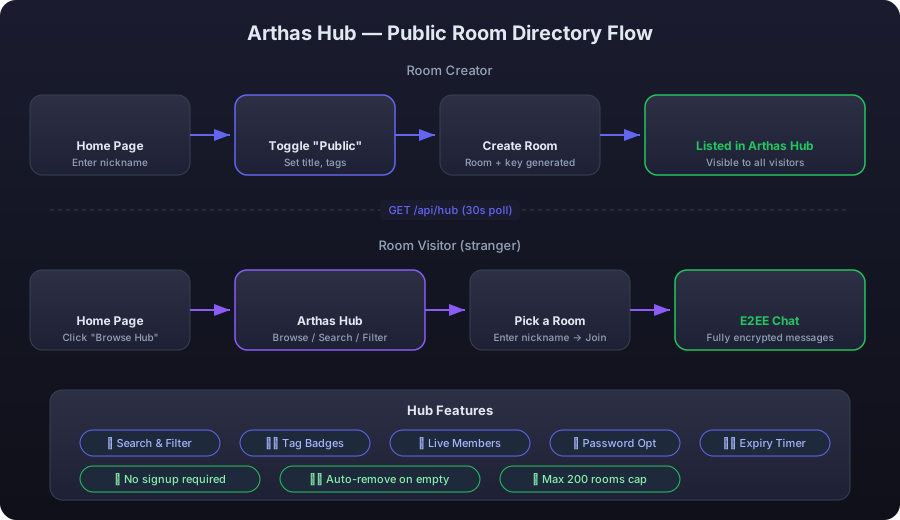
Option 3: Browse and Join via Arthas Hub
If someone has created a public room, you can browse and join it directly without a share code:
- Click ”🌐 Browse Public Rooms” at the bottom of the Home page
- Enter the Hub page and browse the public rooms list
- Pick a room that interests you, enter your nickname
- Click “Join” — you’re in the encrypted chat immediately
To create a public room:
- In the create section on the Home page, toggle ”🌐 List in Arthas Hub (public)”
- Fill in the room title (required), description (optional), and tags (optional)
- Click “Create Room” — it automatically appears in the Hub directory
Tip: Rooms in the Hub still use end-to-end encryption. Public rooms expose their encryption key in the share code to allow anyone to join. For access control, set a room password when creating.
Verifying Encryption
You can verify that messages are truly encrypted in the following ways:
- Check server logs — Server logs only contain connection/room events, with no message content
- Browser developer tools — WebSocket messages in the Network panel appear as binary data (MessagePack-encoded ciphertext)
- Wrong key — Join with an incorrect share code, and received messages will display “Unable to decrypt this message”
FAQ
Frontend can’t connect to the backend?
Check the WebSocket URL in the .env.development file:
VITE_WS_URL=ws://localhost:8080/wsMake sure the backend is running and the port matches.
Port already in use?
The backend port can be changed via an environment variable:
PORT=9090 go run cmd/server/main.goThe frontend port is configured in vite.config.ts:
server: { port: 4000,}Go dependency download fails?
Set a Go proxy (for users in mainland China):
go env -w GOPROXY=https://goproxy.cn,directNext Steps
- System Architecture — Understand the overall design
- CLI Client Guide — Detailed terminal client usage
- Development Guide — Dive into the code structure
- Self-Hosting Guide — Deploy to production